Hyperliquid Take Profit and Stop Loss Guide: TP/SL and OCO Orders
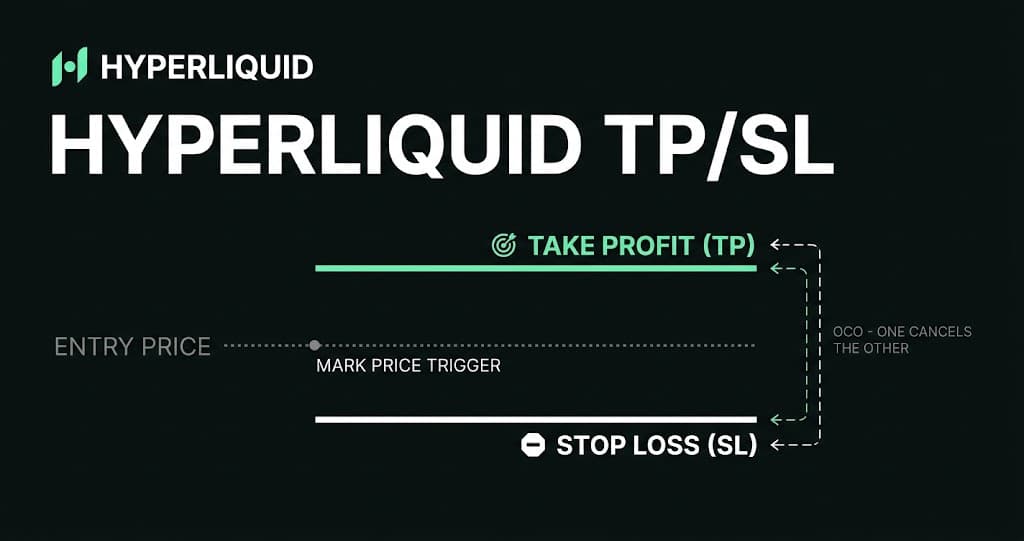
Hyperliquid TP/SL orders trigger from mark price, then submit either a market or limit exit. The trigger price is not a guaranteed fill price, and entry-linked OCO orders behave differently from protection added to an existing position.
Direct answer
How do take-profit and stop-loss orders work on Hyperliquid?
A Hyperliquid take-profit or stop-loss order waits until the market's mark price reaches its trigger condition, then submits a reduce-only market or limit order to close some or all of a position. Position TP/SL orders protect an existing position. Entry-linked TP/SL orders form an OCO group tied to a parent order, and their child exits are placed only under specific fill and cancellation conditions.
Updated 25 Oct 2026
On this page
- How do TP/SL orders differ for long and short positions?
- What price triggers Hyperliquid TP/SL orders?
- Should you use a market or limit TP/SL order?
- How do you add TP/SL to an existing Hyperliquid position?
- How do Hyperliquid OCO orders work?
- What happens when the parent order fills only partially?
- What does a TP/SL setup look like in practice?
- How can a stop price inform position size?
- Can a Hyperliquid stop loss prevent liquidation?
- Do Hyperliquid TP/SL orders pay fees?
- Why did a Hyperliquid TP/SL order not execute as expected?
- How are TP/SL orders represented in the Hyperliquid API?
- What should you check before confirming a TP/SL order?
- The bottom line
Take-profit and stop-loss orders are conditional exits. They remain inactive while their trigger condition is unmet. When Hyperliquid's mark price crosses the chosen level, the system activates the closing order. That second step matters: being triggered and being filled are not the same event.
A take profit closes exposure after a favorable move. A stop loss attempts to close after an adverse move. Both can reduce risk or enforce a plan, but neither fixes the final result in advance. Liquidity, volatility, order type, position size and liquidation distance still affect the execution.
How do TP/SL orders differ for long and short positions?
| Position | Take-profit trigger | Stop-loss trigger | Closing order |
|---|---|---|---|
| Long | Mark price rises to the target | Mark price falls to the stop | Sell to reduce the long |
| Short | Mark price falls to the target | Mark price rises to the stop | Buy to reduce the short |
The closing direction should be the opposite of the open position. A long needs a sell exit; a short needs a buy exit. Hyperliquid requires TP/SL orders to be reduce only, which prevents the exit from deliberately opening a new position in the other direction. An invalid or stale order can still be rejected, cancelled or left unfilled.
What price triggers Hyperliquid TP/SL orders?
Hyperliquid uses mark price to trigger take-profit and stop-loss orders. It does not use one isolated last trade as the trigger. Mark price is a robust fair-value estimate built from oracle and market inputs, and it is also used for margining, liquidations and unrealized profit and loss.
This explains why a chart candle or recent trade can appear to touch a stop while the order remains inactive: the mark price may not have crossed the trigger. The opposite can also happen when mark price reaches the trigger but the eventual execution differs from the number visible on the chart. Check the mark-price field and order history before concluding that the trigger failed.
Should you use a market or limit TP/SL order?
| Exit type | What happens after triggering | Main advantage | Main risk |
|---|---|---|---|
| Market TP/SL | Sends a market-style exit with 10% slippage tolerance | Prioritizes getting out | Fill can be materially worse than the trigger |
| Limit TP/SL | Places an order at the chosen limit price | Controls the worst acceptable execution price | Can remain unfilled after the market moves past it |
Hyperliquid's current documentation states that market TP/SL orders use a 10% slippage tolerance. That is a protective boundary, not a prediction that slippage will be 10% and not a promise that every position will close. A large order in a thin book may consume several price levels or fail to complete within the allowed range.
A limit exit gives more price control. For a long stop, placing the limit below the trigger makes the sell order more aggressive and more likely to fill after a sharp drop. For a short stop, placing the limit above the trigger makes the buy order more aggressive. A limit equal to the trigger can be too restrictive if price gaps through both levels.
The choice is therefore between execution certainty and price certainty, neither of which is absolute. A market stop usually gives a stronger chance of closing but weaker control over price. A stop limit protects the price boundary but can leave the position open during the exact move it was intended to manage.
How do you add TP/SL to an existing Hyperliquid position?
Position-level TP/SL workflow
Find the open position
Use the position table or its chart controls and open the TP/SL form for the exact market and account you want to protect.
Choose the trigger price
For a long, place take profit above and stop loss below the relevant market level. Reverse those directions for a short.
Choose market or limit execution
Use market when closing priority matters most. With limit, set a separate executable price and accept the risk that it may not fill.
Confirm the protected size
The default position TP/SL attempts to close the whole position at trigger time. A manually specified amount is fixed and will not resize later.
Review the active order
After signing, inspect open orders for the correct market, side, trigger, exit type and size. Do not assume the wallet signature alone proves every field was right.
Position TP/SL is the simpler setup because it is associated with exposure that already exists. When the default entire-position option is used, the order attempts to close the position size that exists at trigger time. If a specific amount is entered, that amount stays fixed even if the position later grows or shrinks.
How do Hyperliquid OCO orders work?
An OCO, or one-cancels-other, setup links a take-profit child and a stop-loss child to the same parent entry order. If one child fills, the other can be cancelled as its sibling. This prevents both exits from acting on the same completed trade. Hyperliquid calls this parent-associated TP/SL, and it follows stricter activation rules than position-level protection.
| Feature | Position TP/SL | Parent-order OCO |
|---|---|---|
| Attached to | An existing position | A new entry order |
| Default size | Attempts to close the whole position | Fixed to the parent order size |
| When exits become active | After the position TP/SL is placed | After the parent fully fills, subject to cancellation rules |
| If user cancels a partial parent | Not applicable | Both child exits are cancelled |
| Best suited to | Protecting exposure already open | Planning entry and exits as one group |
What happens when the parent order fills only partially?
If the parent fills completely at placement, its TP and SL children are placed immediately. If the parent remains unfilled or partially filled, the children stay untriggered rather than becoming ordinary live exits. Cancelling an unfilled parent also cancels the children.
The dangerous case is a manual cancellation after a partial fill. Hyperliquid's documentation says both children are fully cancelled, so the filled portion becomes a position without those attached exits. The trader must add separate position TP/SL orders for that remaining exposure.
There is a special exception when a partially filled parent is cancelled because of insufficient margin: the documentation says the TP/SL orders are placed as though the parent were fully filled. Review the resulting active orders and current position immediately instead of assuming the sizes line up with the partial fill.
What does a TP/SL setup look like in practice?
Consider an illustrative one-unit long entered at $2,000. The trader chooses a $2,200 take-profit trigger and a $1,900 stop-loss trigger. If mark price rises to the take-profit condition, the closing sell is activated. If mark price falls to the stop condition first, the stop exit is activated. The example shows mechanics only; it is not a recommended price or risk level.
| Order | Trigger | Possible limit | Purpose |
|---|---|---|---|
| Take-profit limit | $2,200 mark | $2,190 sell limit | Allow a small pullback after triggering while rejecting lower fills |
| Stop-loss limit | $1,900 mark | $1,870 sell limit | Give the exit room to cross the book after a fast drop |
| Stop-loss market | $1,900 mark | No user-set limit | Prioritize closing within the platform's market-order tolerance |
If the market falls directly from $1,920 to $1,850, the $1,900 stop with a $1,870 sell limit may trigger but remain unfilled because bids are already below the acceptable price. A market stop has a better chance of executing through the available bids, but its average fill can be much lower than $1,900. The order book determines the result after triggering.
How can a stop price inform position size?
One basic planning method starts with the amount that can be lost, then divides it by the distance between entry and stop. If a trader limits the planned price loss to $50 and the entry-to-stop distance is $50 per unit, the initial calculation produces one unit of size. Fees, funding and slippage make the realized loss larger, so this is only a starting estimate.
| Input | Example |
|---|---|
| Planned loss before costs | $50 |
| Entry price | $2,000 |
| Stop trigger | $1,950 |
| Distance per unit | $50 |
| Estimated size | $50 ÷ $50 = 1 unit |
Leverage does not reduce the dollar exposure represented by the position. It changes the margin posted and how close liquidation may be. A stop should be considered alongside liquidation price, maintenance margin and available liquidity; placing it beyond liquidation cannot protect the trade from liquidation first.
Can a Hyperliquid stop loss prevent liquidation?
A stop loss can reduce liquidation risk when it is placed before the liquidation level and fills in time, but it cannot guarantee that outcome. Hyperliquid uses mark price for both TP/SL triggers and liquidation calculations. During a fast move, the exit may suffer slippage, a stop-limit may not fill, or liquidation conditions may be reached before the position is fully closed.
The practical buffer depends on leverage, margin mode, position size, book depth and volatility. A stop sitting only slightly before liquidation leaves little room for mark-price updates and execution. Reducing leverage or position size creates a more meaningful margin buffer than relying on a narrowly placed stop as a guarantee.
Do Hyperliquid TP/SL orders pay fees?
A pending trigger does not create a trade. Trading fees apply when the activated closing order fills. A market TP/SL normally removes liquidity and pays the applicable taker fee. A triggered limit order may execute immediately against the book or rest first, so its eventual maker-or-taker treatment depends on how the fill occurs.
Include opening and closing fees, possible funding payments and slippage when estimating the break-even take-profit level. A trigger above entry can still produce a poor or even negative net result if execution is weak, costs are high or only part of the position closes.
Why did a Hyperliquid TP/SL order not execute as expected?
| What happened | Likely explanation | What to inspect |
|---|---|---|
| Chart touched the level but nothing triggered | Last trade moved, but mark price did not cross | Mark-price history and trigger condition |
| Order triggered but position stayed open | Limit price was no longer executable | Open order status, side and limit price |
| Market exit filled far from trigger | Thin liquidity or a rapid move caused slippage | Individual fills and order-book depth |
| OCO children disappeared | Parent was manually cancelled before full fill | Parent status and any partial position |
| Exit covered the wrong amount | A custom fixed size did not resize with the position | Current position versus remaining order size |
| Sibling exit was cancelled | The other OCO child filled | Status such as siblingFilledCanceled |
| TP/SL was rejected | Invalid trigger direction, precision or reduce-only state | Exact error and current position |
Start with order history rather than the chart alone. Record the order ID, trigger, limit, side, size, timestamps and fill prices. Those fields show whether the issue occurred at placement, trigger or execution. Anyone offering to recover a trading loss through a direct message should be treated as a scammer.
How are TP/SL orders represented in the Hyperliquid API?
At the API level, a trigger order contains a trigger price, an isMarket choice and a tpsl value identifying take profit or stop loss. The order action also uses a grouping value: normalTpsl for an entry-linked group, positionTpsl for position protection, or na for orders without that grouping. TP/SL requests must use reduce-only closing logic.
Automation should query frontend open orders or order status after submission instead of assuming a signed request became active. The response can identify trigger orders, their parent or children, position-level TP/SL and cancellation reasons. Use the official SDK for signing, test group behavior on testnet and reconcile open positions after every partial fill or reconnect.
What should you check before confirming a TP/SL order?
- The order belongs to the intended market, wallet and subaccount.
- The take-profit and stop-loss triggers are on the correct sides of the current mark price.
- The closing side is correct for a long or short position.
- The size covers the intended amount and is not an outdated fixed quantity.
- The order is market or limit by deliberate choice, not by default oversight.
- A limit exit has enough distance from the trigger to remain useful during a fast move.
- The stop is meaningfully before liquidation if liquidation avoidance is part of the plan.
- Any entry-linked children are actually active after the parent order's fill status.
- The order appears in open orders after the wallet confirmation succeeds.
The bottom line
Hyperliquid TP/SL orders are two-stage instructions: mark price triggers them, then a market or limit order must execute. Market exits favor completion but can slip. Limit exits protect price but can remain open. That trade-off matters more than the visual position of a line on the chart.
Use position-level TP/SL when protecting exposure that already exists. Use entry-linked OCO only after understanding how full fills, partial fills and parent cancellations control the children. After any position change, verify the live orders again; risk protection is only useful when its side, size and activation state still match the position.
Frequently asked questions
Does Hyperliquid use mark price or last price for stop losses?
Hyperliquid uses mark price to trigger take-profit and stop-loss orders. A last trade or chart candle can cross a level without triggering the order if mark price does not also meet the condition.
What is the difference between a stop-market and stop-limit order on Hyperliquid?
A stop-market order prioritizes exiting after the trigger but can fill at a worse price. A stop-limit order activates a limit order at the selected price, which controls the acceptable fill but may remain unfilled if the market moves through it.
What is the slippage tolerance for a Hyperliquid market TP/SL?
The official documentation states that TP/SL market orders have a 10% slippage tolerance. This is a maximum execution boundary for the order, not an estimate of normal slippage or a guarantee that the full position will close.
Do Hyperliquid TP/SL orders automatically resize?
A position TP/SL using the default entire-position size attempts to close the whole position at trigger time. If you set a specific size, it remains fixed and does not resize when the position later changes.
What happens to TP/SL after a partially filled entry is cancelled?
If you manually cancel a partially filled parent order, its attached TP and SL children are also cancelled. Check the resulting position and place separate position-level exits if you intend to keep it open.
Does OCO mean one exit cancels the other on Hyperliquid?
Yes. In a grouped TP/SL setup, a filled child can cancel its sibling. Hyperliquid order history identifies this with the siblingFilledCanceled status. Parent-fill and cancellation rules still determine whether the children become active first.
Can a Hyperliquid stop loss fail?
Yes. A stop-limit can trigger without filling, while a market stop can experience substantial slippage or fail to complete within its tolerance. A stop also cannot guarantee an exit before liquidation during a rapid move.
Are TP/SL orders charged trading fees?
There is no trade while the trigger is waiting. When the closing order fills, normal trading fees apply according to how that execution provides or removes liquidity and the account's current fee tier and discounts.
Sources
- Hyperliquid documentation - Take profit and stop loss orders↗ external
- Hyperliquid documentation - Order types↗ external
- Hyperliquid documentation - Robust price indices↗ external
- Hyperliquid support - TP/SL execution troubleshooting↗ external
- Hyperliquid documentation - Liquidations↗ external
- Hyperliquid documentation - Exchange endpoint↗ external
- Hyperliquid documentation - Error responses↗ external
- Hyperliquid documentation - Fees↗ external